Buying a new Mazda vehicle 100% online is easier than you think
April 25 2020,
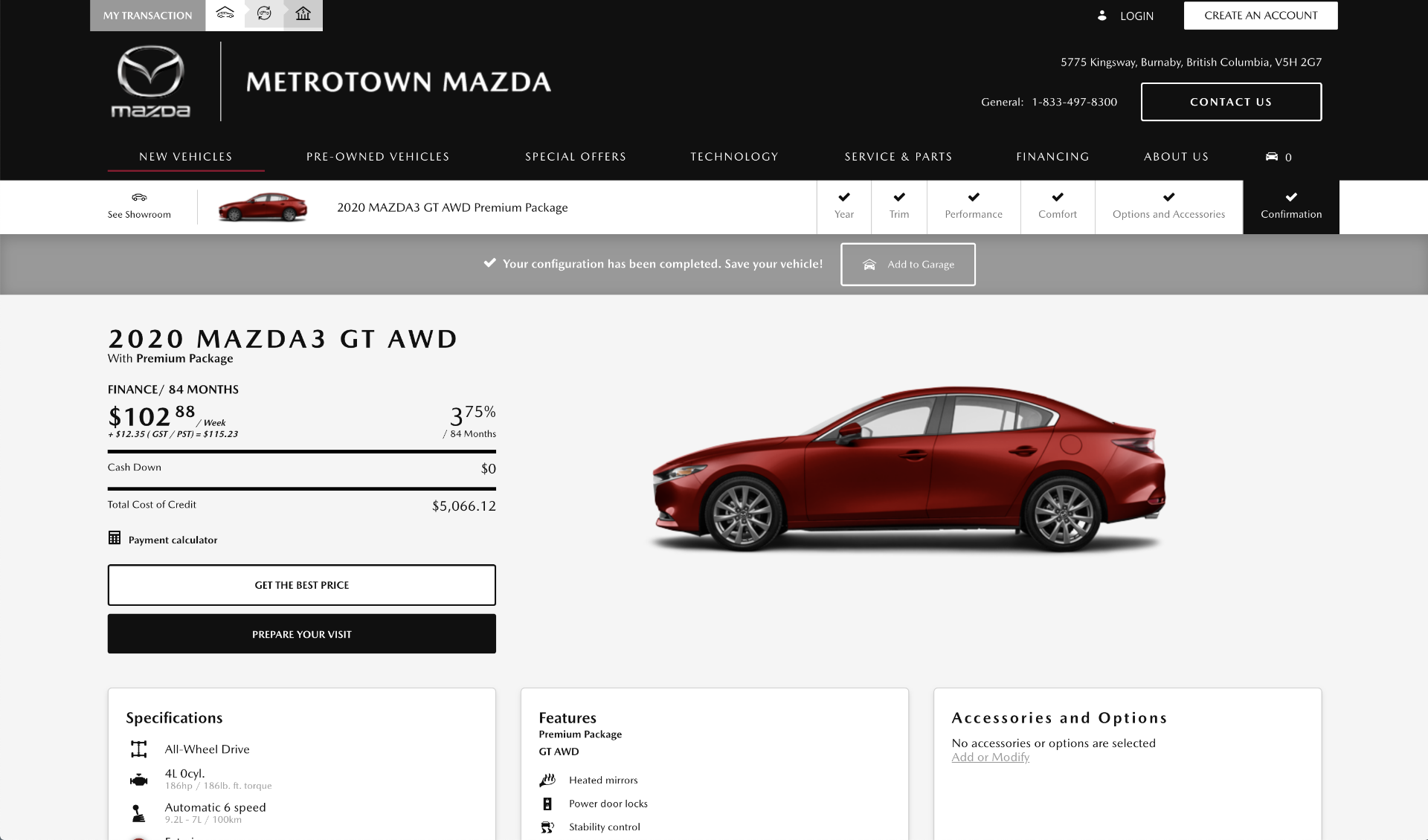
Our daily life has changed completely in the past few weeks, but the good news is that there are still several things we can do online. In particular, you can buy your next new Mazda vehicle entirely online in the comfort and safety of your living room. With our online shopping technology at Metrotown Mazda, it's easier than ever! Here's how our online configurator works and the online shopping process.
Step 1: Go to the "New Vehicles" tab in the menu bar. Below the vehicles you will see a "Build your Mazda" link.
Step 2: You will then see all of the new Mazda vehicles available. For this exercise we are using the 2020 Mazda3. Go down to the Mazda3 and press click.
Step 3: You will see two options for the Mazda3, a 2019 model and a 2020 model. Let’s go with the 2020 model.
Step 4: Here you are on the page of the 2020 Mazda3. Here you can see photos of the Mazda3 both inside and out, the colors available and the terms of financing.
Step 5: If you look at the top, you will see the different versions of the 2020 Mazda3. By modifying the version, you will see the specific colors and the specific design of each model.
Step 6: On the same page, you can see the specifications of each model and the equipment of each version if you scroll down the page. This is where you can find the 2020 Mazda3 perfectly suited to your needs.
Step 7: Once you have found the model, click next. You will see the various options available for that model. We chose the Mazda3 GS, and so we can choose between the manual gearbox or the automatic. There’s also a package for the Mazda3. We will click on the Convenience package, mostly because we want those heated front seats!
Step 8: After clicking next, you will see an accessories page with a range of other possibilities. Here you can find the right accessories to enhance your Mazda and the impact on the monthly payment.
Step 9: At any time, you change your monthly payment and see the different terms available to you by clicking Payment Calculator at the top of the page to the right. You can notably change the financing and leasing details, put a deposit and modify the terms. Finding the right financing plan for you is easier than ever!
Step 10: Once you have finished shopping online, go to the bottom of the page and fill in the information to go to the next step. You can also click Buy Online or Prepare Your Visit. And you are done! We will take it from here and make the process as easy as possible for you.